
More independence.
More connection. Less hovering.
Daily Tools helps make everyday life easier to see, understand and manage, with visual routines, goals, schedules, money skills and rewards, plus optional family and supporter participation.
What is new in Daily Tools.
Daily Tools keeps growing with the people who use it. Here is what arrived most recently.
Use Daily Tools in your language.
Switch between English, Portuguese, Spanish, German, French, Chinese and Vietnamese from the Home menu or Settings. Dates, weekdays and month names follow the language you choose, so families who speak more than one language can each use the app their own way.
Every tool is translated. Only a few owner admin screens stay in English.
Download all your data
Settings has a self-service My data download. It builds one ZIP with everything in your account as a data file, spreadsheets and pictures, and you run it whenever you like. Vault items are included in encrypted form only.
My Day as a flower
My Day opens as a flower of seven petals: health, feelings, sleep, food, day flow, my words and thanks. Tap a petal to answer that part, then go to the next unanswered one. The classic layout is one tap away.
Schedule insights with pay
See a week, a month or a year of shifts at a glance. When payroll info is on, the Schedule also shows gross pay, estimated net pay and pay lost to cancellations. More →
Say how long to wait
In Time Anchor, say a duration like 25 minutes or until 3:30 and the wait fills itself. Works in the app languages where your browser supports speech input.
Vault
A private place for the details families need when applying for things: an ID, an insurance card, a benefits case number. Each item is locked on your device before it is saved, and the caregiver chooses who in the family can see it. Add a photo of the front and back of a card. The Vault locks itself after a few quiet minutes.
Episode Log
A private caregiver log for episodes such as meltdowns, migraines, dizzy spells or falls. Note the time, duration and intensity, then print a clear summary to bring to the doctor. A notebook, not a medical tool.
Time Anchor
See time passing four ways: a filling vessel, segments, a clock disc or a road with milestone flags. A gentle chime sounds when time is up.
Picture Guide
Every tool on one visual page with big icons and few words. Tap a card to hear it read aloud.
Level Up lists with AI help
Supporters describe an everyday activity and get an AI draft to review and edit before saving. Generation uses a cloud AI provider; leave out private details. Optional provider and saved-key backups require a choice for each request, and provider charges may apply. AI privacy details →
Routine and Roadmap libraries
Save named routines and roadmaps, like School Day or Weekend, and switch between them in a tap.
Calendar Day and Week views
Outside calendars now open in Day, Week or Month view. Tap a day to see its timeline. More →
Everyday independence has more than one part.
Instead of presenting a pile of apps, Daily Tools connects the major questions people face across the day.
What am I doing now?
Daily Routine + My Day
What am I working toward?
My Plans + Roadmap
Where do I need to be?
YTW Schedule + Calendar
What do numbers really mean?
My Money + Value of Things
Build a routine that fits the person, then let them own their day.
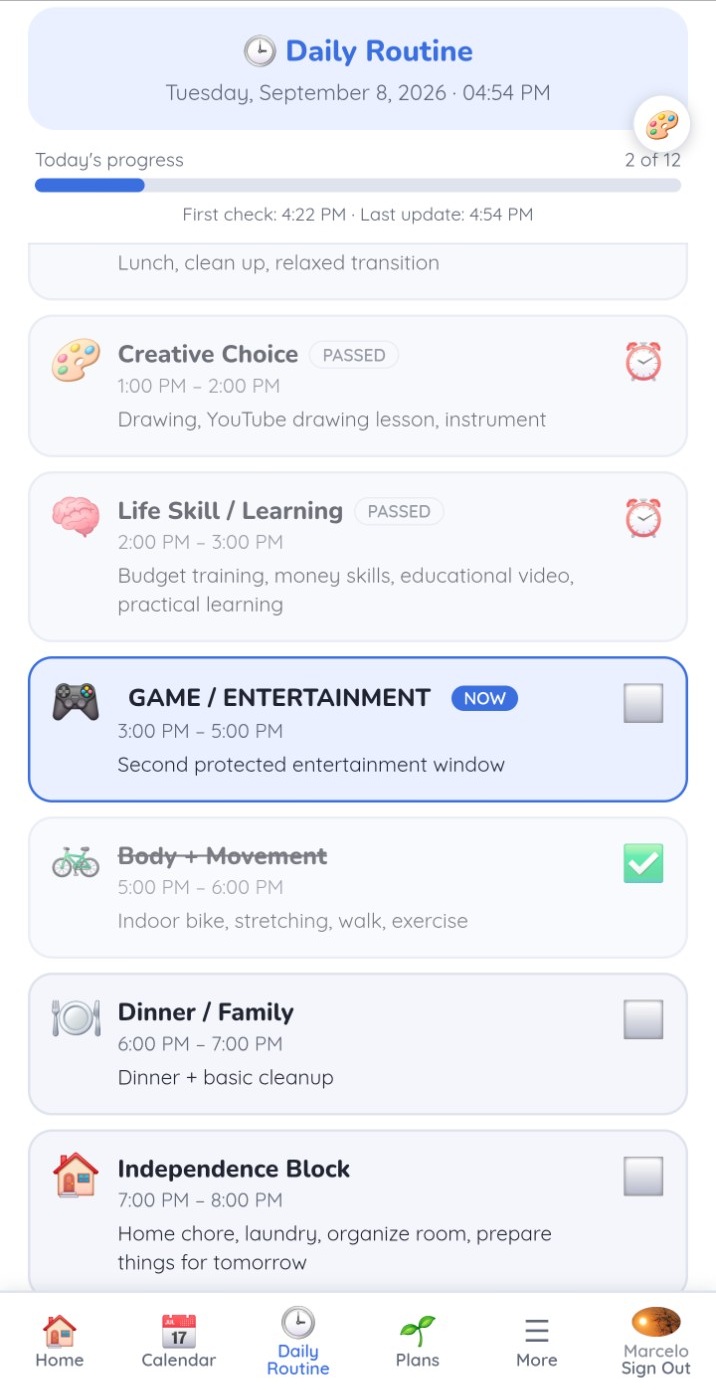
The supported person sees a simple visual flow: what has passed, what is happening now, what comes next and how much of the day is complete. The supporter can configure the routine around real life rather than forcing a fixed template.
Add, remove, rename and resize the routine to match the person's day.
NOW, PASSED and completed states make time and sequence more concrete.
Trusted supporters can see whether the routine is actually being used and followed.
The sample routine can mix learning, movement, responsibilities, family time and protected entertainment, or be reduced to only a few blocks.
Stay connected without turning every moment into a live conversation.
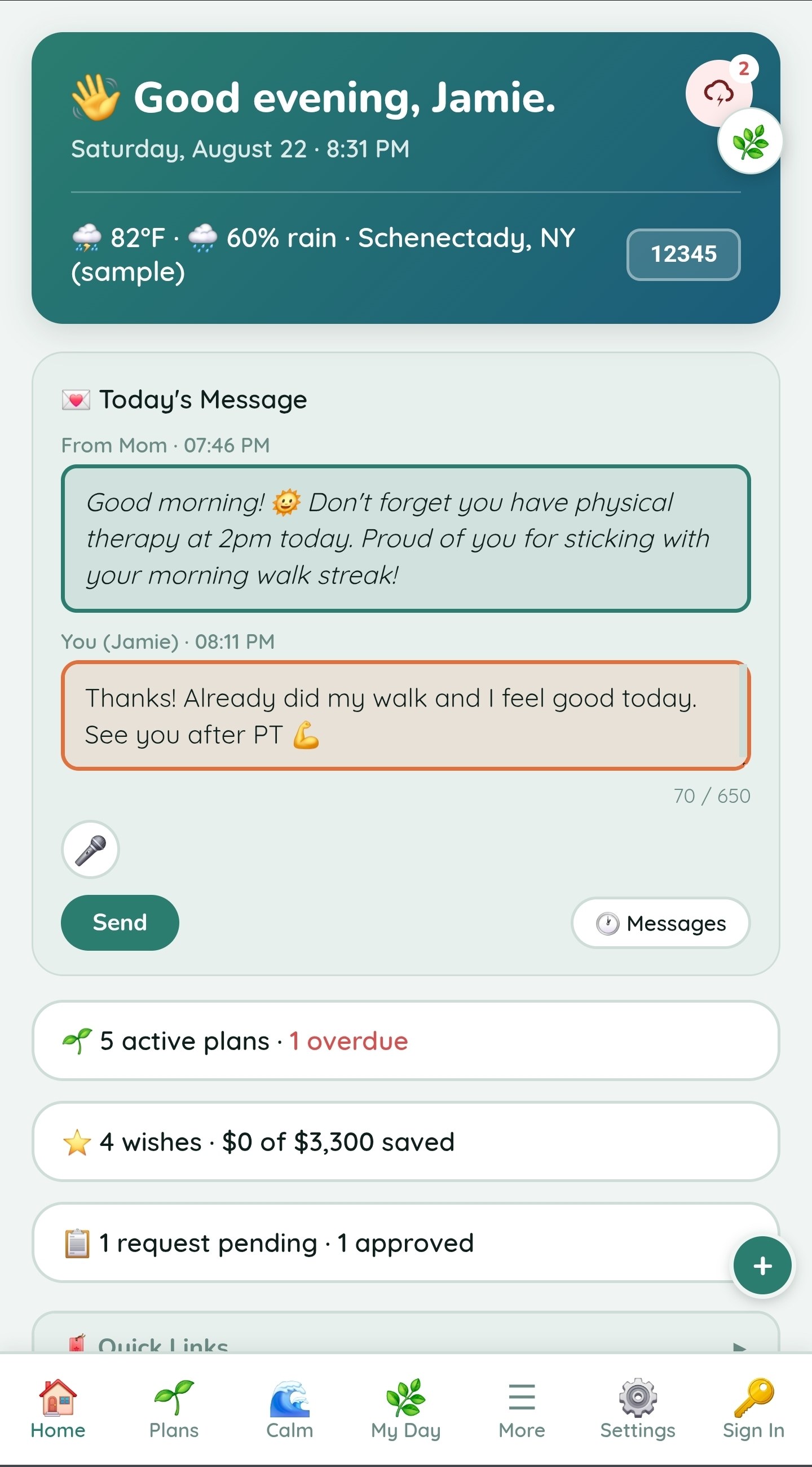
Home brings together Today's Message, Requests, daily information and shared coordination. It gives the person a place to ask, respond and make choices while supporters remain involved where appropriate.
A simple daily communication channel between the person and supporter.
Ask for a ride, budget, purchase or opinion and see whether it is pending, approved or not approved.
Family plans and linked supporter access are built around real multi-user participation.
Choose what to share with trusted supporters. Alarms and confirmation history help with everyday coordination; they are not an emergency monitoring service.
Your goals shouldn't have to feel like another to-do list.
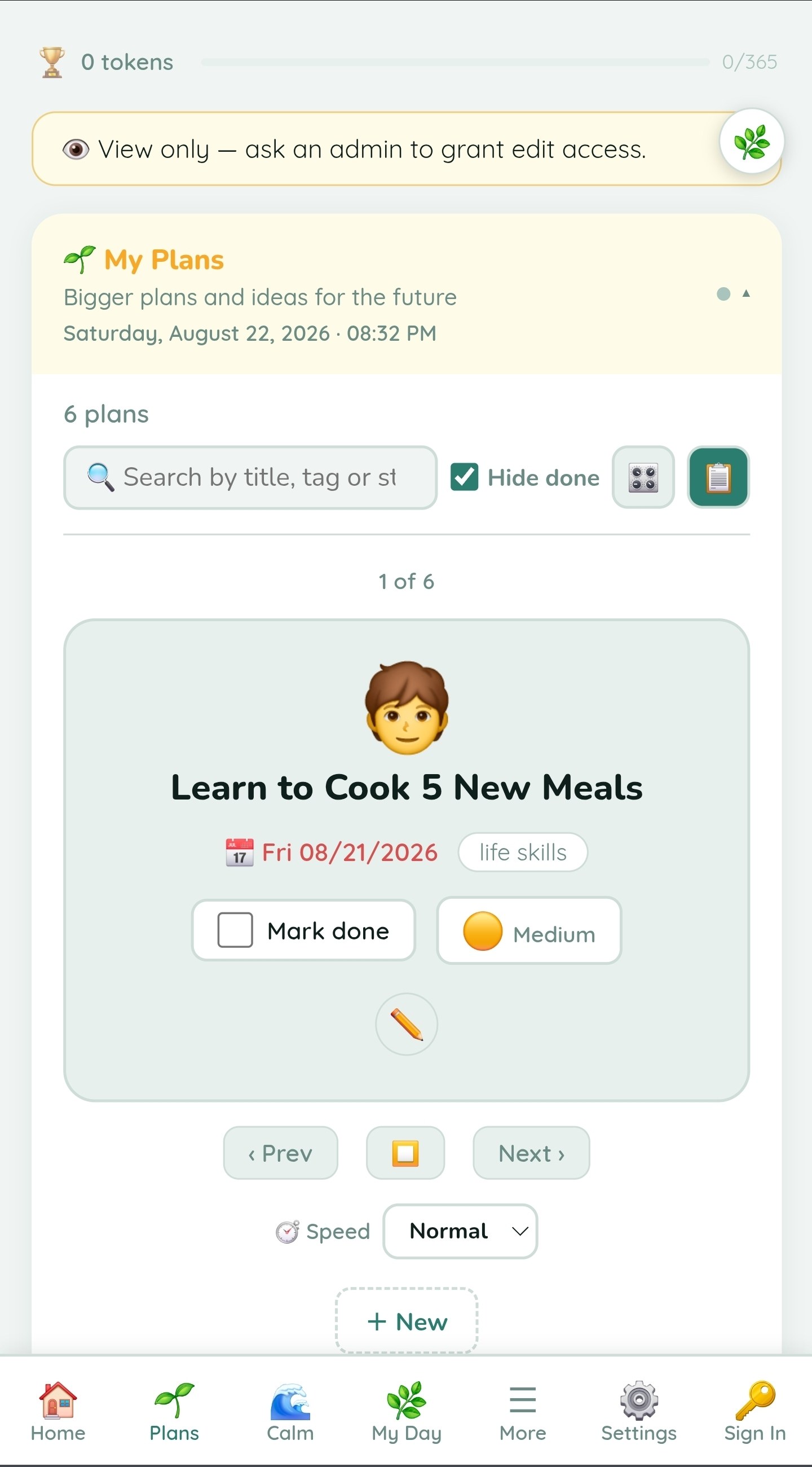
My Plans is the place where bigger ideas and independence goals can stay visible. Card view makes goals feel more like things you're working toward and less like a spreadsheet of chores.
Choose the representation that works best for the person.
Status, dates, tags and priorities are available when useful and can be visually simplified.
A plan can lead into schedules, routines, rewards, money goals and longer-term roadmap milestones.
Manage time, work and the paycheck behind it.
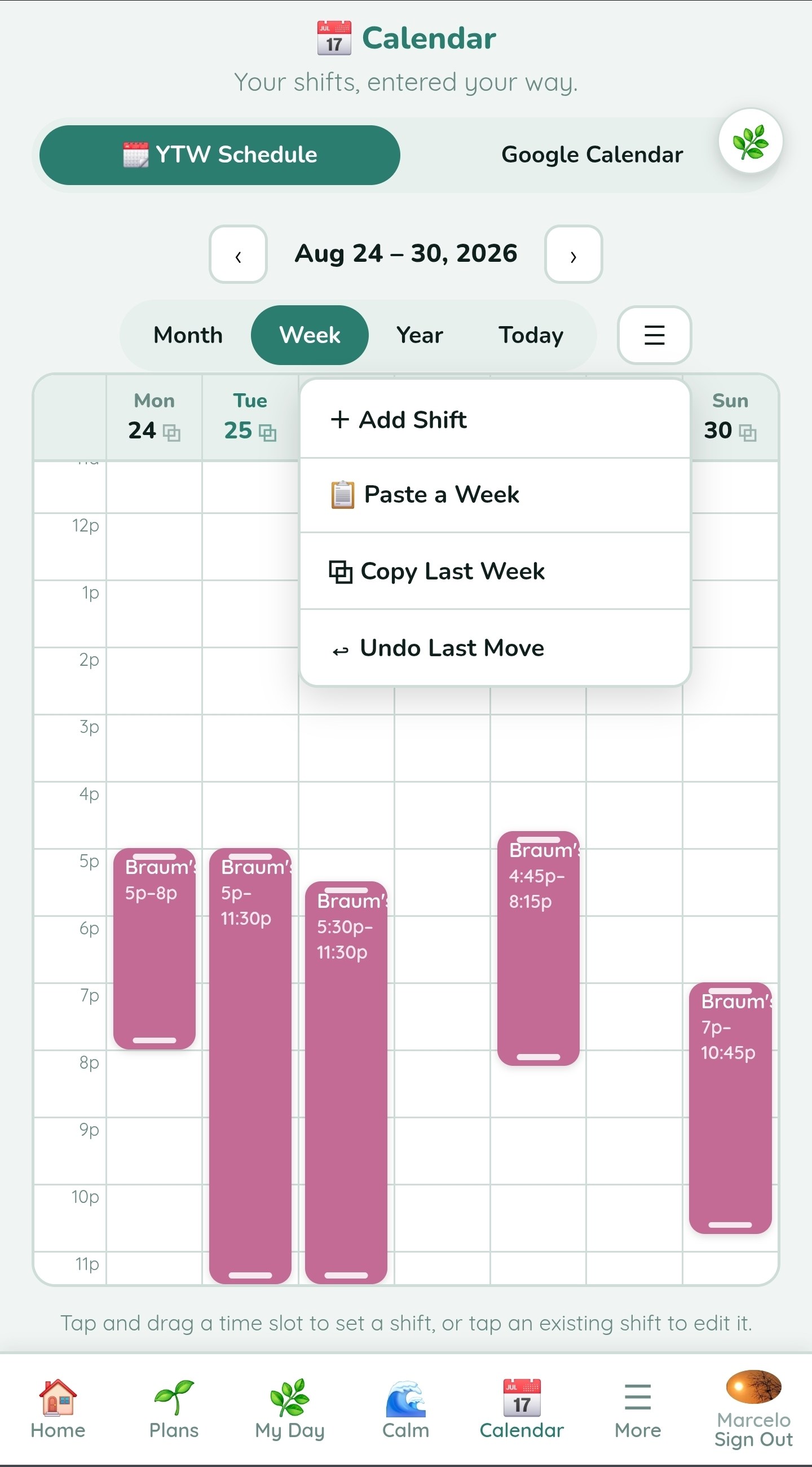
The built-in schedule goes beyond appointments: add shifts, confirm worked time, reuse repeating weeks and estimate payroll, while still supporting outside calendars.


Understand money, not just numbers.
Daily Tools keeps the main money screen simple, then reveals more detail when it helps. It can show what someone has, where it went, and how large one expense is compared with another.
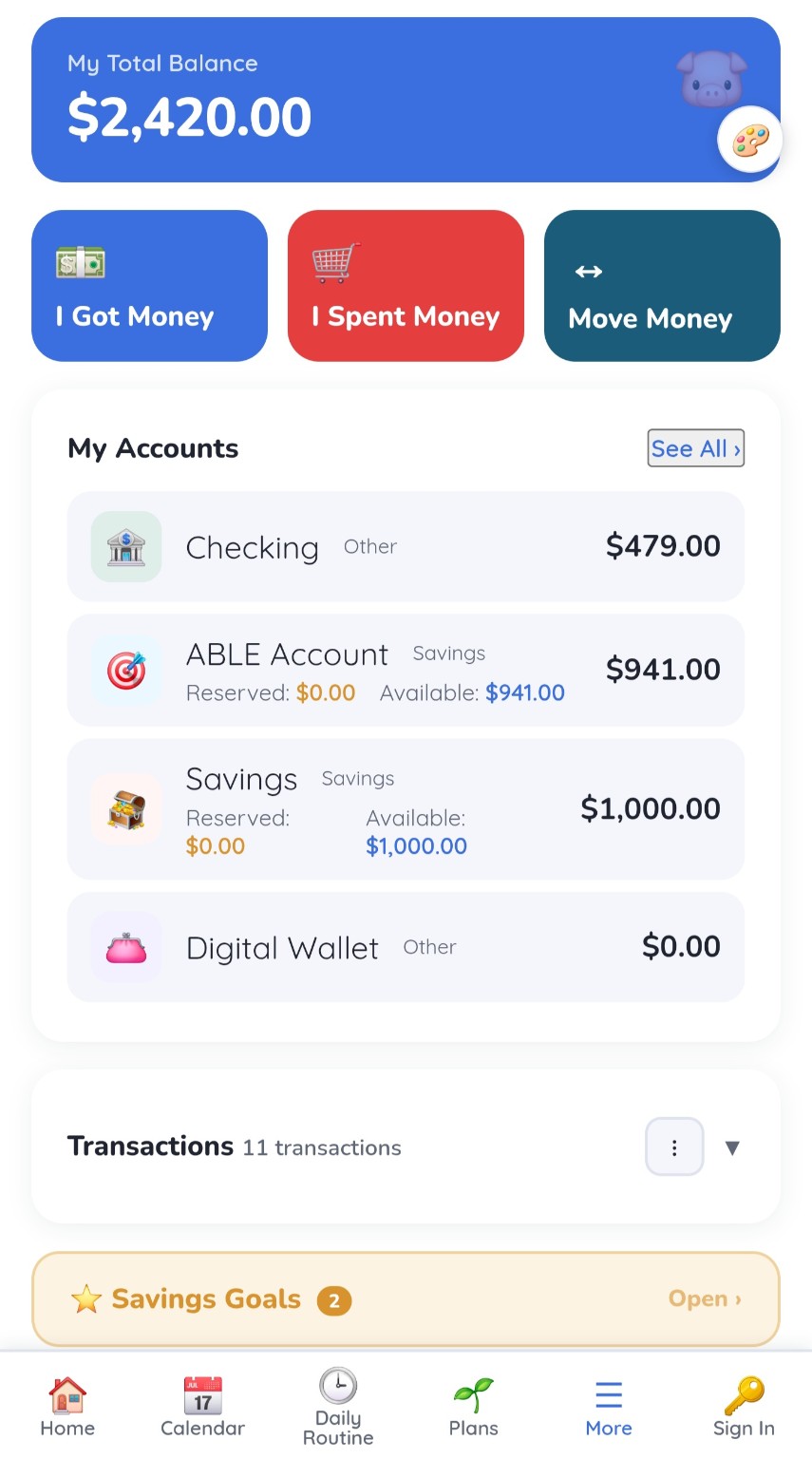
I Got Money · I Spent Money · Move Money
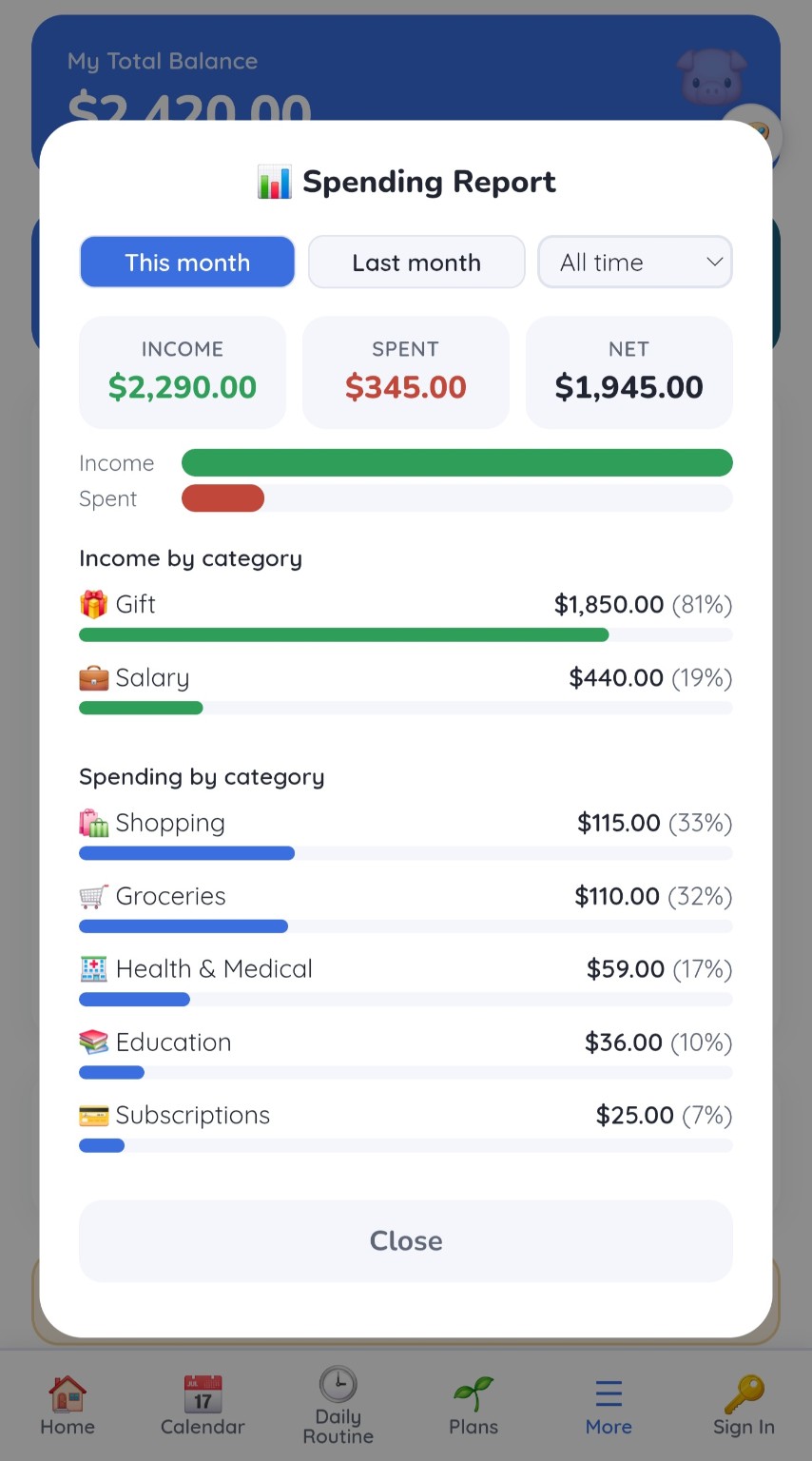
Simple first. Detail on demand.
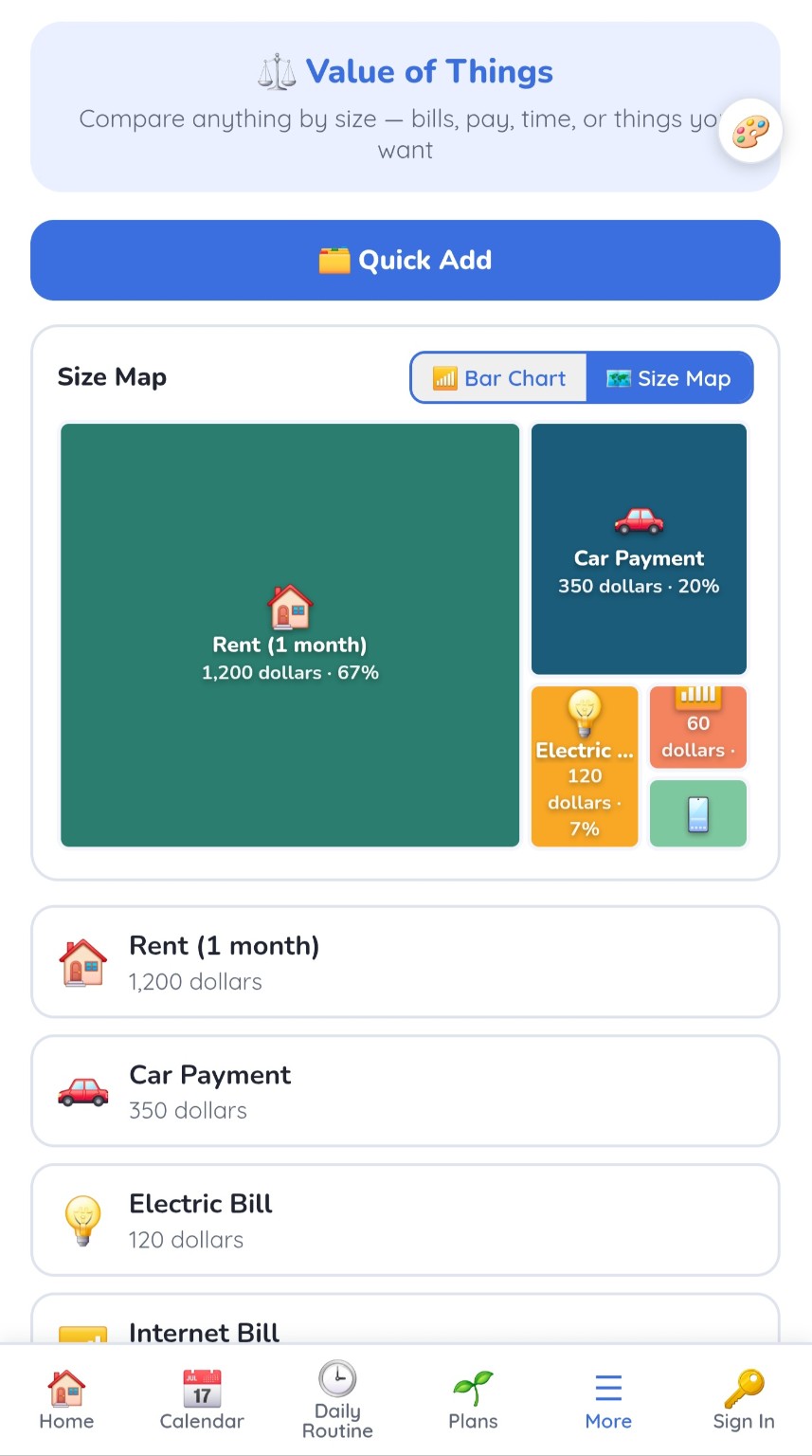
Make relative value visible instead of abstract.
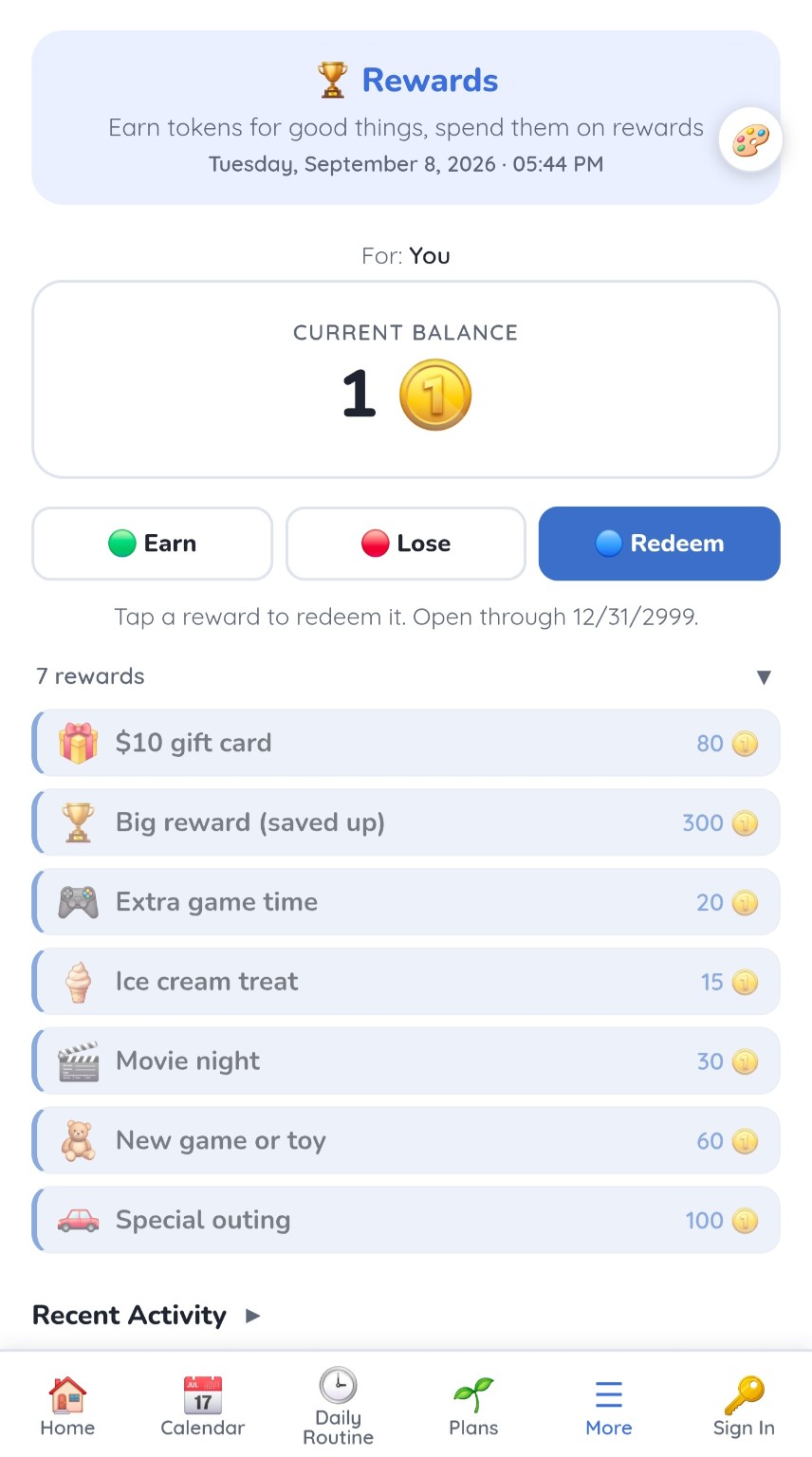
Build the routine. See the progress. Reward the effort.
Goals, Tokens and Activity make effort and progress easier to follow. Supporters can configure automatic rewards for routines, daily check-ins and recurring Level Up lists, while the person earns, saves and chooses a reward.
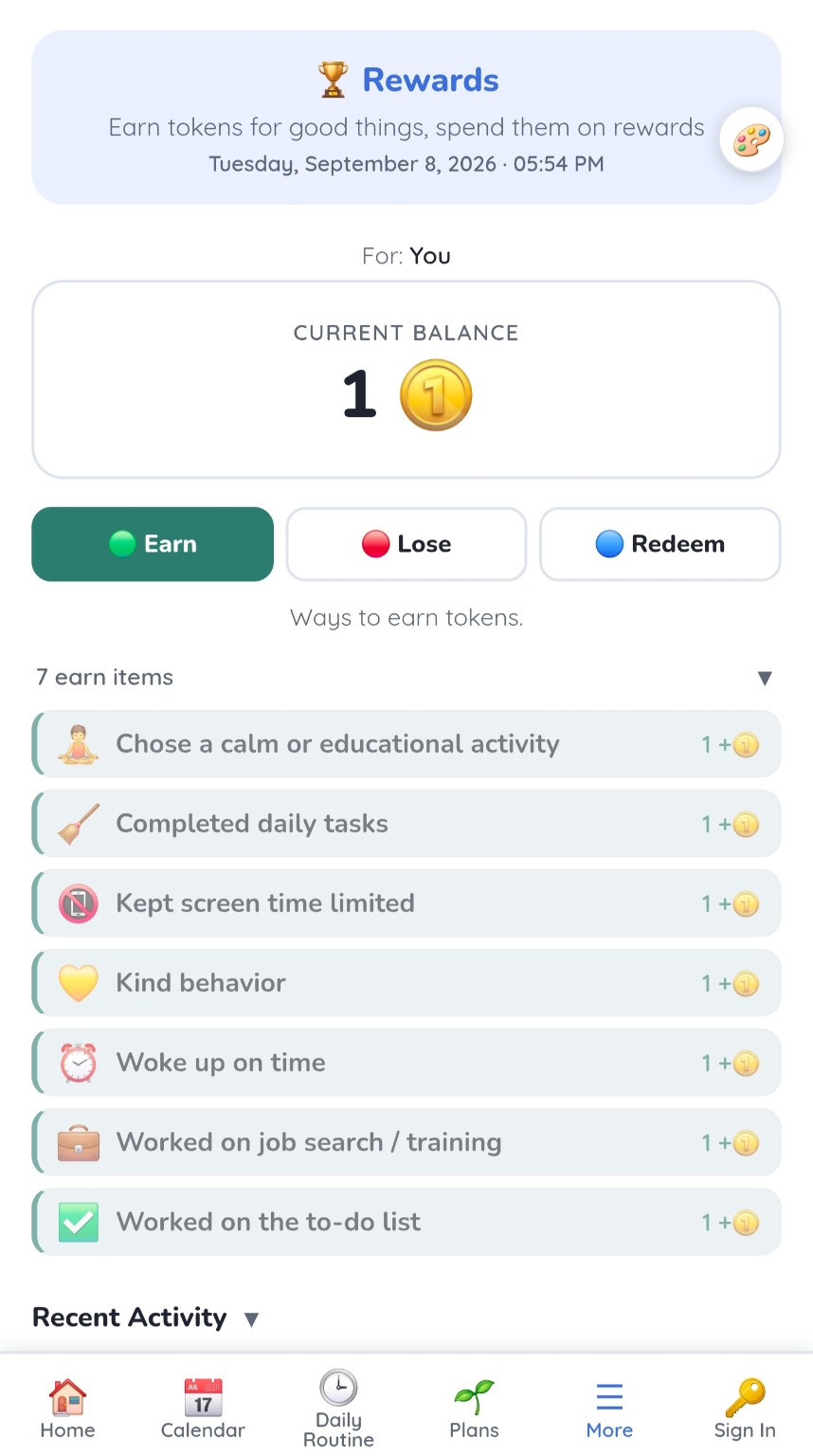
Follow the routine, complete responsibilities, work on learning or other configured goals.
Tokens make progress visible and introduce the idea of accumulating value.
Spend now for a smaller reward or save toward something bigger.
Supporters choose the rules and any redemption conditions in Setup. Automatic rewards update when activity syncs or Rewards opens. Optional deductions can be configured too.
Know how the day actually went.
A calm daily check-in with big, simple answers: mood, how the body feels, sleep, food, medication and the day's activities. When appropriate, it can also work as a caregiver daily report so family can review history later.
Tap a few answers and it saves automatically. Sections you do not need stay collapsed.
"Anything I want to say?" can be kept private, so only the person can read it.
Review daily entries, estimate medication supply from recorded quantities and daily use, and compare recorded refill cycles. Estimates do not track doses taken.
Authorized supporters can help document the day when that workflow is appropriate.

Turn abstract life skills into something visible.
A wider ecosystem without forcing every tool on everyone.
Focus Views let supporters choose a person’s visible tools and schedule starting hour. Start with a few useful tools and adapt the screen as needs change.
Level Up Board
Break everyday activities into small steps. Repeat a list daily and check off progress at your own pace.
Daily Routine
Timed visual structure and progress.
Home
Messages, Requests, alarms and daily snapshot.
My Plans
Visual goals, ideas and projects.
YTW Schedule
Work, time and payroll-oriented scheduling.
My Money
Accounts, spending, savings and goals.
Value of Things
Visualize relative cost and value.
Rewards
Earn, save and redeem tokens.
Life Roadmap
Milestones and future direction.
Cycle Tracker
Visual cycle, mood and energy tracking.
Calm
Breathing, calming sounds and activities for a moment to reset.
Wishes
Things worth planning and saving for.
Picture Frame / Kiosk
Photos, a daily agenda and refill estimates on a spare screen, with the sources you select.
One person. One support team. One connected system.
Daily Tools can support independence without making the person feel like a case file.
For the individual
See the day, make choices, work toward goals, understand money and build confidence.
For family
Configure supports, stay connected and see progress without taking over every decision.
For trusted supporters
Participate through authorized access when invited. Multi-client professional tools can support a broader professional workflow over time.
Small steps, connected across the day.
Choose the tools that fit your life. Here is one way a person and their support team might use them together.
- Start the morning
See what is next in Daily Routine and check off the steps in a Level Up list.
- Plan work and spending
Check a shift in Schedule, then use My Money to record spending or work toward a savings goal.
- See progress
Follow a goal in Rewards, save tokens and choose when to redeem an available reward.
- Stay connected
Leave a message or a My Day check-in for an authorized supporter to review.
This is an illustrative workflow. Sharing and automatic reward rules depend on your settings.
Start with the level of support that matches your life.
Personal for one person. Family for supported independence and shared participation. Invited professional supporters can participate without a separate per-client subscription, while Professional Pro is the multi-client path.